Posts

Showing posts with the label Javascript

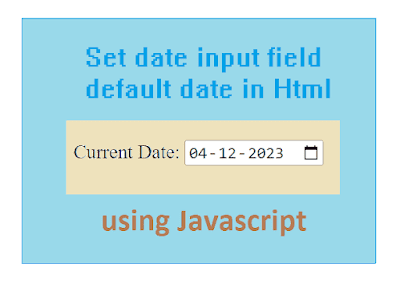
How to show current date in Html date field
Image
 Date field default date in HTML      In this tutorial, we learn How to set up current date as a default date value in HTML date field using JavaScript. It is visible when a page is loaded. Here is an example: In this code, we used the JavaScript date to generate a date and set that date to the HTML date field. MOVETOP↑   index.php   <html> <head> <title> Codingzon Tutorials </title> <body bgcolor= "" > <center> <p id= "datetime" > </p> <form> Current Date: <input type= "date" name= "date1" id= "date1" plaseholder= "Date1" ><br/> </form> <script>   // ***************** Get current date and time in JavaScript ***************** // var now = new Date (); // reading each part of datetime var day = now.getDate(); var month = now.getMonth() + 1 ; var year = now.getFullYear(); if (month < 10 ) month = "0...

Es6 Module

Image
Export-Import in ES6 JavaScript's ES6 allow you to organize the code components in the form of modules and can be import them into other modules. This makes code maintenance easier. If they are written in separate files. With the help of import and export keywords, Modules can be used in other programs. Using Export You can export a function or variable from any file. Let us create a file named employee.js, and fill it with the things we want to export. There are two types of exports: 1. Named and 2. Default. Named exports must be enclosed using curly braces. Default exports do not. Named Exports You can create named exports two ways. 1. In-line individually, or 2. All at once at the bottom. MOVETOP↑   Example In-line individually: export const empname = "benny" export const empage = 30 // first declare variable and export let empcompany = "xyz" export {empcompany } All at once at the bottom: employeerecord.js // first declare variable and export cons...

Es6 Destructuring

Image
Es6 Destructuring  ES6HOME What is Destructuring Destructuring makes it easy to extract array values from any index. Using Destructuring With destructing, we can assign array items to variables:   const userdata = [ 'John' , 'john@gmail.com' , '123451234' ]; const [name,email, phone] = userdata ; // assiging array values to different variables.     When destructuring arrays, Keep in mind the order of the variables that you are providing. To extract only name,phone write the following way. const [name,,phone] = userdata ;       MOVETOP↑   Destructuring with Array Default values The following example shows how Array Destructuring Assignment will work with array Default value. const userdata = [ 'John' , 'john@gmail.com' , '123451234' ]; onst [name = "John" , email = "john@gmail.com" ] = [ "Doe" ]; console.log(name); // Deo console.log(email); // john@gmail.com     Using array destructurning...

Es6 Array Functions

Image
 ES6 Array Methods     ES6HOME Es6 provided us many cool functions which helps us to code better. So in this blog we are going to discuss some of the best array functions. These functions can help you to develop efficient code with reduced complexity. So let's get started! concat() :  This method will combine two or more arrays and produce one single array object. const arr1 = [ 'a' , 'b' , 'c' ]; const arr2 = [ 'x' , 'y' , 'z' ];   const arr3 = arr1.concat(arr2); consol.log(arr3);   output:     ['a','b','c','x','y','z'];       map():     This method operated on each element in the array, and finally produce the new array with results.   const arr1 = [ '1' , '2' , '3' ]; const arr2 = arr1.map((x) => x * 2 );      output:      2,4,6         ES6HOME filter(): This filter function reads each element of the array and compares it with the given conditio...

ES6 Variables

Image
ES6 Variables     Now, with ES6, there are three keywords available to define variables: They provide different levels of scope to access the variable. Based on the requirement, you can define variables with these keywords and control its accessibility. var  let const   Using ES6 var Example var x = 9.9 ; If var declared outside a function, it belongs to the global scope. If var declared inside a function , it belongs to that function. If var declared inside the block, ex: in a for loop, the variable is still available outside that block. var has a function scope, not a block scope.   Using ES6  let Example   let x = 9.9 ; let is the block scoped version of var, and is limited to the block, where it is defined. If you use let inside a block, i.e. a for loop, the variable is only available inside that loop. let has a block scope. Using ES6 const Example const   y = 9.9 ;   y=10;   // It will result in an error     constant i...

ES6 Arrow Functions

Image
ES6 Arrow Functions   ES6HOME Arrow function in es6 anonymous function. It does not have any name and does not start with function keyword. Arrow function in ES6:   var arrowfun = () => { console.log( "Example Arrow Function" ); }; Optional parentheses for the single parameter var data = n => { console.log(n); } data( 10 ); Optional braces for single statement/parameter and the empty braces if there is no parameter to be passed. var display = () => console.log( "Hello World" );   display ();   Arrow function with multiple parameters: let sum = (a, b) => a + b; document .write(sum( 10 , 20 )); // Output 30 GO TOP Arrow function with default parameters: In ES6, parameters can initialize with some default values, if there is no value passed to it, or it is undefined. You can see the illustration for the same in the following code: For example var display = (a, b= 200 ) => { console.log(a + " " + b); } disp...

ES6 Tutorial

Image
JavaScript ES6 Tutorial   What is ES6? ES6 known as ECMAScript6, It is advanced version o JavaScript, introduced to standardized JavaScript . It was published in 2015, that's the reason it is also called as ECMAScript2015. It is added some new features to JavaScript. Some popular features of the ECMAScript 6 are as follows… Classes Arrow Functions Variables (let, const, var) Array Functions Modules Destructuring Spread Operator   Popular ES6 frameworks such as ReactJS, AngularJS, and Vue.js implemented these features     ES6 Classes:   ES6 introduced classes. A class starts with a class keyword. Class contains constructor(). Inside, the constrictor properties are initialized.   class Person{ constructor(name) { this .pname = name; } } Create an object called "pobj" based on the Car class: const pobj = new Person( "John" );     demo.html    <!DOCTYPE html> <html> <body> <script> class Person{ ...

Using javascript pass form variables to iframe src

Image
   Open PDF in Bootstrap Modal Window   This tutorial shows How to pass a JavaScript/jQuery variable to bootstrap modal view and sets it to iframe  src attribute. It passes value dynamically to src attribute of the iframe. When the user clicks a link, it opens the URL in a popup window. This  code shows the PDF in a Model without download option by hiding the toolbar.  To show PDF toolbar in modal, just add #toolbar=1   in the above script. index.php <!DOCTYPE html> <html lang= "en" > <head> <title>Bootstrap Model with PDF Example - coding-zon</title> <meta charset= "utf-8" > <meta name= "viewport" content= "width=device-width, initial-scale=1" > <link rel= "stylesheet" href= "https://cdn.jsdelivr.net/npm/bootstrap@4.6.2/dist/css/bootstrap.min.css" > <script src= "https://cdn.jsdelivr.net/npm/jquery@3.6.1/dist/jquery.slim....

A Simple AJAX with JAVA Example

Image
 A Simple AJAX with JSP example    Java Tutorial Home   What is Ajax? AJAX stands for Asynchronous JavaScript And XML, Ajax is a technique allows communicating with servers asynchronously. It means  at the same time, the server can receive the request and send the response to the client. Ajax implemented with the help of XMLHttpRequest Object. It is a predefined object supported by every browser. Supports different types of data formats such as  XML, HTML, JSON and text files.       In this tutorial, we are going to learn how to make an AJAX call using  JavaScript XMLHttpRequest Object using JSP and MySQL.   Table of Contents Project Structure jspAjaxDB.html jspAjaxDB.js jspAjaxDB.jsp Queries Result        Project Structure: Create a web project in eclipse create the following files which are marked in a picture and copy the code given below in those files. And create a table in the database and insert the dat...